
Quick Start
Saving Quotes from Articles
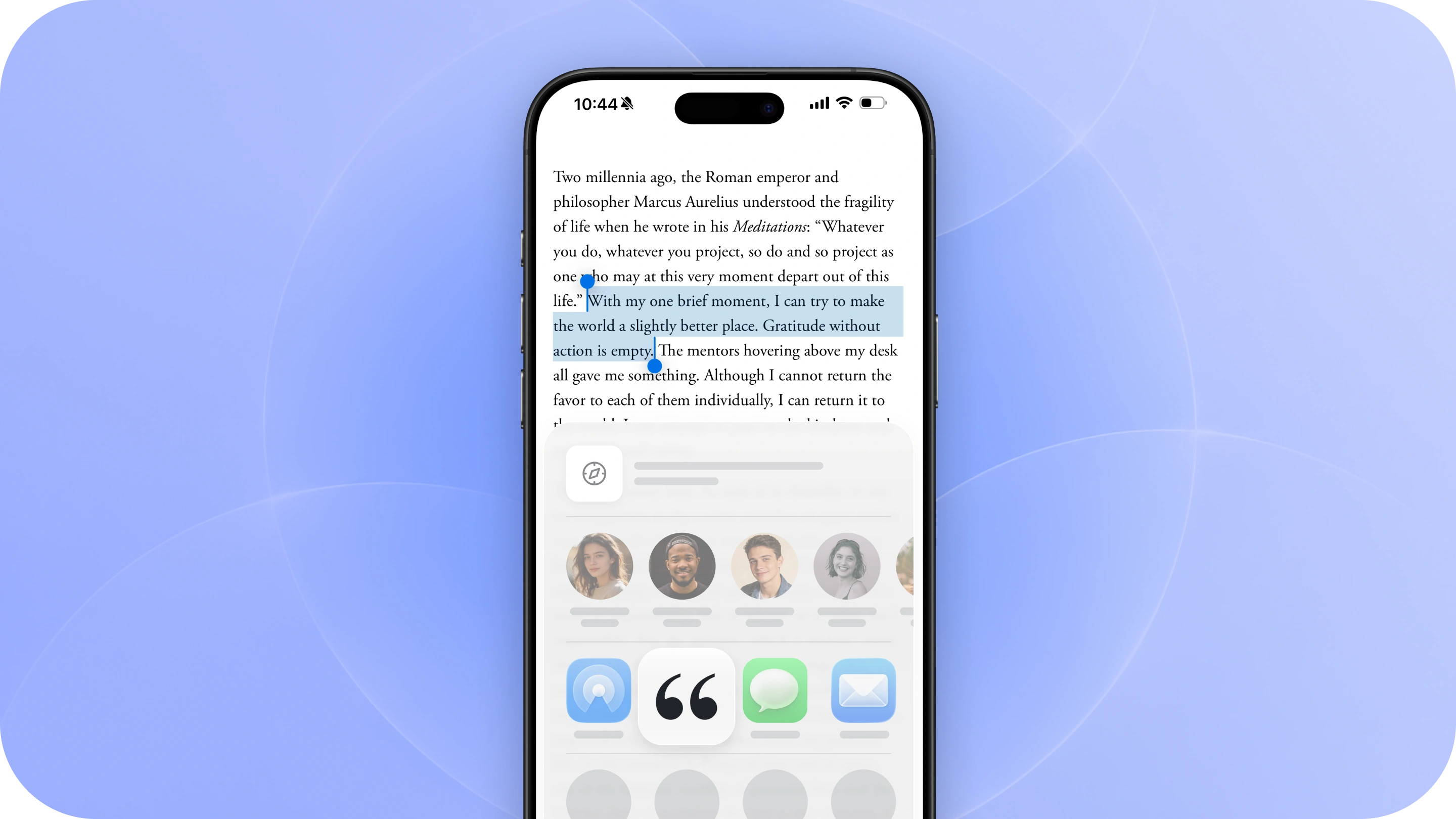
Come across an interesting idea worth saving while reading online? You can save it directly to Commonplace in just a few taps, without leaving where you’re reading.
1. Highlight & Copy to Clipboard
While reading an article in any browser or app, highlight the text you want to save. Tap Copy from the menu that appears.
You can copy a single sentence, a full paragraph, or any passage you want to come back to later.
2. Share the Article Link to Commonplace
With the text copied to your clipboard, tap Share on the article link. Select Commonplace from the Share Sheet.
If you don’t see Commonplace right away, scroll through your apps and tap More. You can also add Commonplace to your favorites to keep it near the front of your Share Sheet.
3. We’ll take care of the rest
When you share a quote, Commonplace will automatically pull in details about the article, including:
- Article title
- Author
- Publication or website
- Link to the original article
- Images
That means you can focus on capturing the idea rather than organizing all the information around it.
Save more from the same article
Found another idea worth keeping? Just highlight and share it the same way.
Commonplace recognizes when quotes come from the same article and keeps them together, so you can return to the article later and see everything you saved in one place.
Keep reading
That’s it. Once your quote is saved, you can jump right back into what you were reading.